Free & open sourceWindows & LinuxNo account needed
PeepNoteStored locally
All notes
TODAY
3 notes
Markdown
RAG · 2 min read
The RAG pipeline, simplified
Good answers start with the right context.
Documents→Retrieve→Answer
The five steps
Chunk your documents into useful pieces.
Embed them so meaning becomes searchable.
Retrieve the context that fits the question.
Augment your prompt with what you found.
Generate an answer grounded in your sources.
↳ Keep the context close. The answer gets better.
Stored locallyTry a note, or open Quick List
Try PeepNote with sample notes.
FROM CONVERSATION TO COLLECTION
Keep the good bits. Keep going.
Your AI chats move fast. The useful parts don’t have to disappear with them.
01 / 05
A good answer deserves a home.
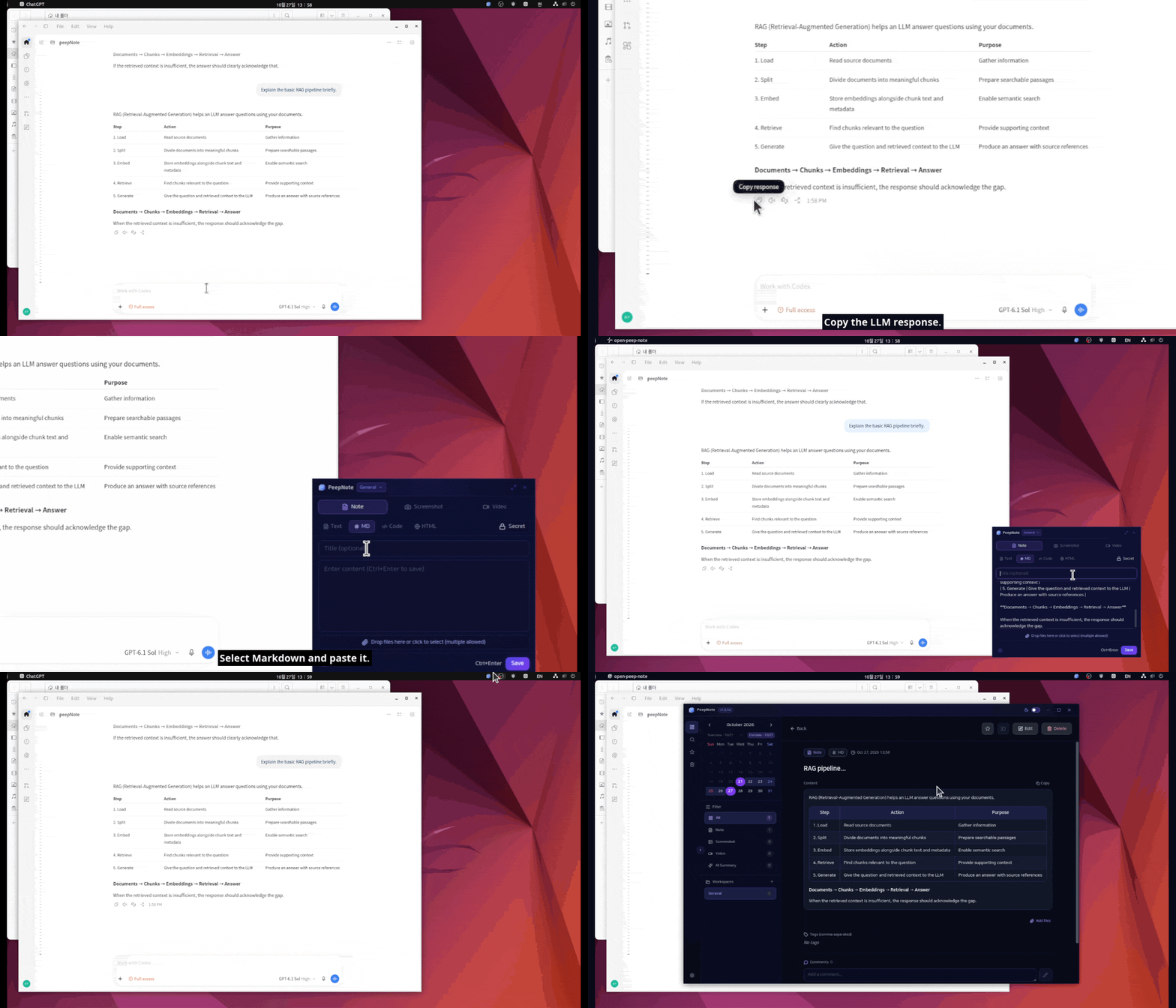
Copy an LLM response, open PeepNote with a keyboard shortcut, and paste it as Markdown. Tables, headings, and code stay readable.
✦Alt + 1
A PLACE FOR EVERYTHING WORTH KEEPING
Thoughtfully small. Surprisingly capable.
A workspace for every rabbit hole
Keep research, projects, and everyday ideas in their own spaces.
More than words
Keep files and images with a note. Open or download them when you need them.
Find the words inside an image
Extract English and Korean text locally, then find it through search.
A little privacy
Hide secret note previews and use a four-digit PIN before opening them.
Keep your hands on the keyboard
Create, capture, and recall with global shortcuts you can customize.
Make yourself at home
Light or dark. Four app languages. Choose where your data lives.
PeepNote
Local storage by default++
YOUR NOTES. YOUR COMPUTER.
A place of your own.
Your notes and attachments live on your computer, in a folder you choose. No account to create. No cloud sync to set up. Just a useful little app, ready when you are.
AI summaries are optional and use your configured provider and API key.
Yes. PeepNote is free and open source under the Apache 2.0 license. Optional AI summaries use your own API key; your provider may charge for those requests.
Where are my notes stored?
On your computer. You can choose a different data folder in Settings. PeepNote copies your notes, attachments, and settings there when it restarts, and keeps the original files as a backup.
Do I need an AI API key?
Only if you want to use AI summaries. Notes, Markdown, screenshots, file attachments, Quick List, and local OCR work without one. Summaries send the selected non-secret written content to the provider you configure.
Which platforms are available?
Windows x64 and Linux amd64. The download page has the latest Windows installer and Ubuntu/Debian .deb package.